Articles by "Android Apps"

Showing posts with label Android Apps. Show all posts


How to Download APK Files from Google Play Store to PC
Google Play Store, by default, doesn’t allow the download of APKs for free games and apps stored there and it installs the requested app or game on the device directly. If you want to download and install the APK files for certain games and apps from Play Store on your Android device using your computer, then there are some solutions which let you download APK files from Plays Store right on your PC.

After downloading the APK files on your computer, you can then install the APK files on your Android phone or tablet using any Smartphone manager or by directly transferring the APK file to your device using any connectivity medium like USB connectivity data cable or BlueTooth.


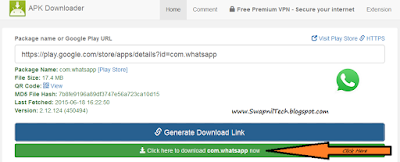
How to Download APK with Online APK Downloader:
  • In the Box labelled “Package name OR Google Play URL” Enter either the Google Play URL or Package name of the app which you want to download.
  • No Click on the Blue-colored “Generate Download Link” button, The App will be fetched and A Green button to Download the App/apk will appear below the Blue “Generate Download Link” button.
  • Click on Green button (Download button)
  • Save It.
APK Downloader Websites:

1.
Evozi.com 


                          http://apps.evozi.com/apk-downloader/ 


2. Downloader-apk

http://downloader-apk.com/
  

3. Apk-dl.com 

http://apk-dl.com/


4. Apkleecher.com 


5. Freeapk.ru 


# Download Offcial Android Apps Latest Updates
Without Google Play Store:


>>  www.apkmirror.com


Download Apk from Google Play without Device ID - Online Apk Downloader

Enjoy.. :D

.


Pokémon GO Game for Android & iOS

Venusaur, Charizard, Blastoise, Pikachu, and many other Pokémon have been discovered on planet Earth!
Now’s your chance to discover and capture the Pokémon all around you—so get your shoes on, step outside, and explore the world. You’ll join one of three teams and battle for the prestige and ownership of Gyms with your Pokémon at your side.

Pokémon are out there, and you need to find them. As you walk around a neighborhood, your smartphone will vibrate when there’s a Pokémon nearby. Take aim and throw a Poké Ball… You’ll have to stay alert, or it might get away!

Search far and wide for Pokémon and items
Certain Pokémon appear near their native environment—look for Water-type Pokémon by lakes and oceans. Visit PokéStops, found at interesting places like museums, art installations, historical markers, and monuments, to stock up on Poké Balls and helpful items.

Catching, hatching, evolving, and more
As you level up, you’ll be able to catch more-powerful Pokémon to complete your Pokédex. You can add to your collection by hatching Pokémon Eggs based on the distances you walk. Help your Pokémon evolve by catching many of the same kind.

Take on Gym battles and defend your Gym
As your Charmander evolves to Charmeleon and then Charizard, you can battle together to defeat a Gym and assign your Pokémon to defend it against all comers.

It’s time to get moving your real-life adventures await!

Notes:
- This app is free-to-play and offers in-game purchases. It is optimized for smartphones, not tablets.
- Compatible with Android devices that have 2GB RAM or more and have Android Version 4.4 - 6.0+ installed.
- Compatibility is not guaranteed for devices without GPS capabilities or devices that are connected only to Wi-Fi networks
- Not compatible with Android devices that use Intel Atom processors.
- Compatibility with tablet devices is not guaranteed.
- Application may not run on certain devices even if they have compatible OS versions installed.
- It is recommended to play while connected to a network in order to obtain accurate location information.
- Compatibility information may be changed at any time.
- Please visit www.PokemonGO.com for additional compatibility information.


# Pokemon Go Apk: How to Download Pokemon Go for Android


Steps to Download Pokemon Go on Android:
  • On your phone go to Settings.
  • Tap on Security (also labelled as Privacy on some devices).
  • Go to Unknown sources.
  • Tap Allow for the installation of apps from unknown sources. This will allow you to install Pokemon Go.
  • On your phone, download Pokemon Go from here.
  • Now simply go to the Downloads folder on your phone and install it.

You can now play Pokemon Go on Android.


Download Pokemon GO for Android:

  Google Play Store  


 ApkMirror Store  (Direct Download)


  ApkPure  


# Pokemon Go iOS: How to Download Pokemon Go for iPhone, iPad

How to create a US account on iTunes:
  • Create a new Apple ID at this page.
  • Choose United States from the drop-down menu while creating your Apple ID.
  • On your iPhone open the App Store. Tap Featured on the bottom panel.
  • Scroll to the bottom and tap your Apple ID.
  • Tap Sign Out if you are already signed in.
  • Next, tap the Sign In button.
  • Key in your new Apple ID and password.
  • You'll see a pop-up that reads "This Apple ID has not yet been used in the iTunes Store". Tap Review.
  • Tap United States under COUNTRY OR REGION. Tap Next.
  • Read the terms and conditions and Apple's privacy policy and tap Agree.
  • Tap Agree again in the pop-up.
  • Under BILLING INFORMATION tap None.
  • Scroll down and key in a valid US address - search the Internet!
  • Key in a phone number. Then tap Next.
  • Tap Done on the top-right.


How to download and install Pokemon Go on iPhone
  • Now that you have a US account, just tap the Search button on the bottom panel.
  • Search for Pokemon Go or tap here.
  • Tap Get to download and install Pokemon Go on your iPhone.

Once you've installed the app, repeat steps 3 to 7 above to switch back to your primary Apple ID. The game will still work even after you switch the ID, although you will have to return to your US iTunes account to update the app.


Download Pokemon Go for iPhone, iPad:


 iTunes Store


Search Tags:
Pokémon GO APK,
Pokémon GO Game,
How to Download Pokemon Go on Android and iOS,
How to Download Pokemon Go on Android,
How to Download Pokemon Go on iOS,
Pokemon Go iOS: How to Download Pokemon Go for iPhone, iPad,
How to Download Pokemon Go APK, Install, and Play on Android


Remix OS for PC: How to install the Google Play Store

Remix OS is a custom version of Android designed to make Google’s mobile operating system feel like a desktop OS. Initially only available as an operating system that came pre-installed on hardware, this week the developers at Jide made it easy for anyone to try Remix OS


Download and install Google Mobile Services on Remix OS

Note:
You’ll want to do this while running Remix OS in resident mode.
If you run in guest mode, anything you do will be erased after you reboot you PC and since the instructions require a reboot, that means there’s currently no way to install the Play Store in guest mode.

Steps:

1. Download the   GMSInstaller.apk   OR   GMSInstaller.apk   

2. Click the downloaded file to Install it.

3. Run the GMSInstaller app.

4. Select “One-click to install Google Services

5. After the Google services are downloaded and installed,
Open the Remix OS Settings app
and go to Applications,
Find the “Manager Applications” option,
and then choose “All

6. Scroll down until you see Google Play Services, select it, and
click the “Manage space” link,
and click the “Clear All Data” option on the next screen.

7. Find Google Google Services Framework the same way,
and this time just click the “Clear Data” button.

8. Reboot Remix OS.

Enjoy, Google Play Store on Remix OS for PC


Note: You may need to update Google Play Services form Play Store,

 Google Play Servies Download links:

 Google Play Store  ||  Apk Mirror   


Download Remix OS:

  Download Remix OS for PC   


.

IPTV STB Emulator Pro 0.7.06


Pro-version
  • Ad free
  • Less apk size
  • Supports software remote controls for MAG 250

IPTV STB Emulator is an application for Android 4.0+, which allows users to open web portals, designed to run on IPTV STBs to watch internet TV. At this moment STBs MAG100/200/245/250 and AuraHD from Ukrainian company Infomir are supported.

Since version 0.5.24 the application is splitted into two version: a free version with ads and a Pro version (ad free). For some reasons they a published from different developer accounts on Google Play, but don't worry, these accounts both belongs to the same developer.


To work with this application you have to create at least one STB profile - a set of options required for emulation. In most cases you need to have a real STB to get some data from it and write into profile. But anyways, a lot of web portals are free and open for everyone, so you only need portal's URL to write into profile configuration. More information you can read on page STB profile.


WARNING!
This app is designed to be used by experienced users.
To work correctly it must be configured first and
if you’ve never configured STB MAG 250/Aura HD you may have troubles while configuring it.


More Info:

 Google Play Store  


IPTV STB Emulator Pro 0.7.06 Full Version:

  Download Here  ||  Download Here  


.


First Immediate Response (F.I.R) (By Thane Police)


In case of any emergency you can use FIR app.
FIR app will send user's Geo-location (using GPS of mobile device) to the Control Room of Mira Bhayander Police on a single click of help button.


How to Install:
  • Download FIR App
  • Resister with your Details
    [You register your details, including your identity, contact number (including alternate number) and email.]
  • Click on "Help" Button

How it's Works (Video):


How it's Works:
In case of distress, the victim (who has registered with the app) presses the 'FIR' button on his/her cellphone.
The name, phone number and location of the victim will flash on the monitor installed in the control room at the Mira Road police station

The officer monitoring the app will contact the concerned police station - Bhayander (west), Navghar, Utan, Mira Road, Naya Nagar or Kashimira - who would then reach the spot.


This app is specially made for womens and senior citizens.


Downloads:

FIR Android App
FIR Android App


#Share


Charlie Android App
(Share Your Idea's Worldwide)


It is a world where everyone is a Charlie. You can ask Charlie, you can answer Charlie, because you are a Charlie. Charlie is a crazy idea.

 What's New
* Chat unlimited without reveling your identity,
* Discuss on the topics you love most.
* Create post with code word added in topic to chat privately.
* Check whats trending in the world.
* and much more in Charlie.
* Post Bug Fixed

HOW TO START:
Charlie is a crazy idea. You just open a Charlie and become one. Simply open a 'live feed' and check what other charlies are writing about or open 'trending today' to know what other charlies are talking about. If you want to read about new shows review simply search that. Also, if you didn't found any post regarding your query then simply post it by adding title, topics and your thought.(and if you don't want to add topics/tags or description..you don't need to write in it.)
And all this you can do. It is a world where everyone is a Charlie. You can ask Charlie, you can answer Charlie, because you are a Charlie.

WHY USE CHARLIE:
And all this you can do completely ANONYMOUSLY. YES.... you don't need to create any account or register/verify your number..So, debate on anything with No tension of CENSORSHIP.


THE NEXT COOL THING:
* You can also do a private chat. Yes, though you will act as a charlie like others you can do it.
* Just create 'new post' with unique topic/tag like ks3h26xqz and
* tell other users to search the same tag with whom you want to chat
* as no one will search for this kind of tag other than you and the users you told the tag.
* So, you can do the private chat openly without compromising to your privacy.[or without saving history.]
* You can also create a private group with same kind of thing.

THE FUTURE:
Charlie can be used as open discussion table, a movie review system, a live football match cheering, to play word game, to read jokes...lots of jokes, also to chat privately, and to make some noise too.

I don't know for what purpose and how many ways, it will be used. But it will make us think to be one one Charlie..and don't think as individual.

And just a condition whatever you will write or read take it in funny way or lightly and don't be serious or rude on any post. If you are downloading and/or using it then you are agreed to this term. And if you are disagree with it, then don't use it.


Contact us:
 Facebook

 Official Website


Download Now:


Charlie On Google Play Store
Google Play Store

Charlies On Amazon App Store
Amazon App Store


Note: Download, Review it and support us to make it better.
 

 Download WhatsApp for PC with Bluestacks:


You can download many applications like WhatsApp Messenger etc on the Google Play Store with the help of BlueStacks.


## How to Running WhatsApp on PC :
First of all, you need to download Bluestacks in Windows PC or Mac.


Bluestacks Website


BlueStacks Offline Download Links:

  Bluestacks Download Here
(Without Root)


OR

  Download Bluestacks Here
(Pre-rooted with SuperSU)


  and Install it on your pc. After installing Open it.

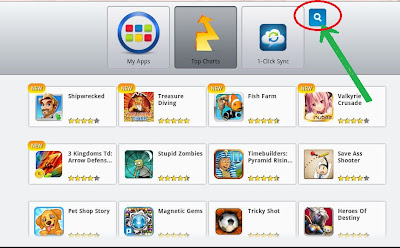
# Now Open the Application You can Find the Screen Capture Just Like Below Picture


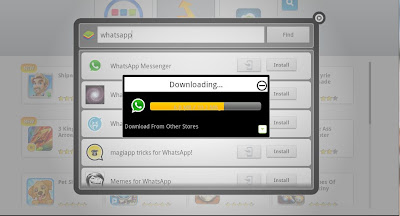
> Now Click on Search icon and search for Whatsapp


> Now choose the whatsapp messenger form any market .its your wish.


> Just click and Download whatsapp after selecting from any
app store


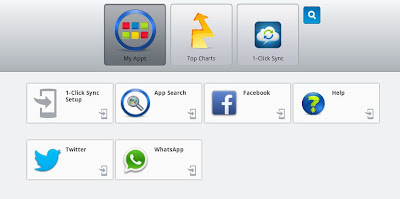
> You can find downloaded app in My Apps.


OR

 Download Whatsapp

> Now click on WhatsApp fill the Details and Start using it.

# Problem with App Player for Surface Pro solved!
If you're having issues with touch response,


click this link:

Win8 Reg File

Click "Yes" to all prompts, restart your Surface and it will work great!
Enjoy,

# Import Contacts From PC To WhatsApp:

 
1) Create a contacts file in Excel.

2) Need to convert Excel sheet to V-Card. V-Card will have .vcf as its file extension. Then convert Excel to.vcf and save those contacts.

3) Open BlueStack application. One more important thing is you need to install file manager application on BlueStack along with WhatsApp.

4) Go To 'C' Drive ---> Program Data
 If you didn't see Program Data don't worry it was hidden. Make sure that folder options should be in 'Show Hidden Files'.

5) Now Program Data > BluStacks > UserData > Shared Folder
Then remove all the folders if have any. Then upload your contacts (V-Card .vcf File).

6) Open File Manager application on BlueStack then Go To > My Files > SdCard > bstfolder
then add every contact file(.vcf) manually.

OR
Backup Your Contacts Using Android Mobile

Android Mobile > Contacts > Option > Export To Sd Card > 0001.vcf

Then Copy & Past in

C:\ProgramData\BlueStacks\UserData\SharedFolder

[[ Past Here ]]

.


Link2SD is an application manager that makes it easy for Android users on their phone to move applications to the SD card.

Description:
Link2SD is an application manager that makes it easy for Android 2.1+ users to move applications to the SD card, to clean all cache files of the apps. It enables you to manage your apps and storage easily.It also provides native app to SD (app2sd) features on Android 2.2 and higher. It can move any non-protected user apps to SD card (force move), with batch moving capability.
That feature uses Android's standard SD-card installation feature and does not require a second partition.
Cache cleaner function clears all your cache and free up space with a single tap. Also cache cleaner widget displays total cache size and enables "one tap cache cleaning" without opening the app.

Features:

✔ App manager
✔ Create and remove link for apk, dex and lib files of the app.
✔ Plus version also links private data files of the apps
✔ Automatically link newly installed apps (optional)
✔ Move any user apps to SD even though the app does not support moving to SD
    
(a.k.a. "force move", for Android 2.2 and higher)
✔ Shows the apps that support moving to SD with native apps2sd
✔ Set the default install location of the apps; auto, internal, or external
✔ Batch link, unlink, reinstall, uninstall, "move to SD", "move to phone" functions
✔ Notify when movable apps installed
✔ Uninstall system applications (bloatware removal)
✔ Freeze and un-freeze system and users applications
✔ Convert system apps into user apps
✔ Convert user apps into system apps
✔ Integrate "Updated" system apps into system (ROM)
✔ Clear data and cache of the application
✔ Batch clear data and cache of the selected apps
✔ Clear all apps cache at once (1-tap cache cleaner without being root)
✔ Exclusion list for "Clear all app cache" function
✔ Clear cache widget (1-tap cache cleaner without being root)
✔ Notify if total cache size exceeds specified size
✔ Reboot manager includes power off, normal reboot, quick (hot) reboot, reboot recovery,
    reboot bootloader / download mode
✔ Reboot widget to boot with one click
✔ List applications, show detailed size information and link status
✔ Wide variety of options to sort and filter apps
✔ Search applications by name
✔ Display available space information of internal storage, SD card and SD card 2nd partition
✔ Share the Play Store link or the APK (app's full package) file of the apps
✔ Create shortcut for the apps
✔ Support 40+ languages

Plus features:
✔ Links internal data directories of the apps to SD card
✔ Links dex files of the system apps to SD card
✔ Auto clear cache service
✔ Removes ads from Link2SD


What you Need for Linking Apps:
● Root permission.
● Second partition on your SD card.

  • You should have two partitions on SD card and both should be primary.
    The first FAT partition is your standard SD card storage. The second partition is used for application files and can be ext2, ext3, ext4, f2fs or FAT.
  • You need to use a non-FAT file system (ext2, ext3, ext4 or f2fs) on your second partition in order to link app's private data files. Because the FAT file system (FAT16, FAT32 or exFAT) does not support UNIX file ownership or permissions and causes a security breakdown of app's private files.
    Link2SD Plus can move app's private data files if you have a non-FAT partition
  • Link2SD does not create the second partition, you need to create it yourself. You can use any partition manager such as Minitool, Paragon, Easeus etc. for this.
  • When you connect your phone to PC as mass storage, Android unmounts the first FAT partition but the second partition remains mounted. Therefore linked applications are not affected and can be run without problems.
Link2SD is free (ad supported) application.

DISCLAIMER:
It is made available for use at your own risk with no warranty of any kind.

>> Link2Sd FAQ


Download from Play Store:
 Download Here

Author Name

{picture#https://instagram.fbom1-2.fna.fbcdn.net/t51.2885-19/s150x150/17662158_221658868312088_138323287238246400_a.jpg} Hi, I am Swapnil Zambare. I love to explore Computer and Internet. My aim is to spread tips and tricks related to Hacking, Computer, Android phones, Blogging, SEO, Social networks and many mores all over the world for free so that every one can enjoy our Premium Services for Completely Free. {facebook#https://www.facebook.com/SwapnilTech} {twitter#https://twitter.com/swapnilzambare7} {google#YOUR_SOCIAL_PROFILE_URL} {pinterest#YOUR_SOCIAL_PROFILE_URL} {youtube#YOUR_SOCIAL_PROFILE_URL} {instagram#https://www.instagram.com/theswapnilzambare/}

Contact Form

Name

Email *

Message *

Powered by Blogger.